

 Guide
Symptom guide
Refrigerator Not Cooling: Safe Checks Before Service
A warm refrigerator needs two decisions: protect the food and identify the appliance’s next safe step. Start with the…
Soft ice cream, ice cubes that never set, or a freezer that reads 15 °F. Which checks owners can do, in which order, how long each one takes to show a result, and the signs that the problem is inside the sealed system or the defrost circuit.
By ApplianceCodeHQ Editorial Updated
A freezer that stops freezing properly rarely fails all at once. More often the ice cream turns soft first, then ice cubes take a day instead of a few hours, then the meat feels pliable at the edges. The good news is that many causes are outside the sealed cooling system: a setting, a mode left on from the store, a door that does not quite seal, or airflow blocked by the very food you are trying to keep frozen. The checks below run in a practical order, and each comes with the time it needs to show a result, so a slow recovery is not mistaken for a failure.
Short answer
The FDA recommends keeping the freezer at 0 °F. Measure with a freestanding appliance thermometer, because the display shows a setting or one sensor, not the temperature of your food.
Put an appliance thermometer in the middle of the freezer, between packages, and read it after several hours with the door closed. Samsung’s default freezer setting is -2 °F, a little below the FDA target, and it notes that ice cream stays firmer below about 3 °F. A reading of 5 °F means a soft dessert and a warning; a reading in the teens or higher means the freezer is not doing its job. Also note whether the fresh-food section is still cold. If both are warm, start with our general cooling guide; if only the freezer is warm, the steps below are the right place.
Look at the freezer setting before anything else; it may have been bumped during cleaning. Then look for a display or demo mode. Samsung says a display showing OF OF, O FF, OFF OFF or scrolling bars means Cooling Off Mode, which keeps the lights and display working but stops cooling. Whirlpool describes the same idea as showroom or demo mode. Some Whirlpool models also need to be switched back on manually after a power outage. If the refrigerator was just installed, Whirlpool allows 24 hours to reach temperature.
Every gap in the gasket lets warm, moist air in, and that air turns into frost that makes everything worse. Samsung’s test uses a dollar bill: close it halfway in the door and pull; you should feel slight resistance. Try it at several points around the door. If it slides out, clean the seal with dish soap and a damp cloth and test again. Frost or condensation right at the door edge, a drawer that does not slide fully home, or packaging left from delivery are common culprits. A unit that is not level can leave a door slightly open on one side, and Samsung recommends leveling it.
A freezer cools by blowing air over a cold coil and through vents, usually at the back. Packing food tightly against the back and side walls, or covering a vent with a bag of ice, stops that circulation. Samsung asks for food to stay 2 inches away from interior vents and for ice or frost on the vents to be cleared. Outside, the appliance needs room to get rid of heat: Samsung specifies 2 inches of clearance at the back, top and sides. Whirlpool adds that condenser coils in greasy, dusty or pet-heavy homes may need cleaning every two to three months, while some models can only be cleaned by a technician.
A large batch of unfrozen food warms a freezer, and Whirlpool says it can take several hours to stabilize; Samsung also suggests letting hot food cool before it goes in. The room matters too. Whirlpool designs its refrigerators for indoor use between 55 and 110 °F and advises against a garage that gets colder than 55 °F; Samsung’s limits are 50 to 110 °F. If the appliance has to live in a garage, check the manual for a model rated for it.
| After you… | Wait | Source |
|---|---|---|
| Change the setting | At least 24 hours before the next change | Whirlpool |
| Change the setting (Samsung) | Up to 4 hours for the display, up to 28 hours to reach it | Samsung |
| Power cycle for 2 minutes | About 3 hours for temperatures to start dropping | Samsung |
| Install a new refrigerator | 24 hours to reach temperature | Whirlpool |
| Add a large warm load | Several hours | Whirlpool |
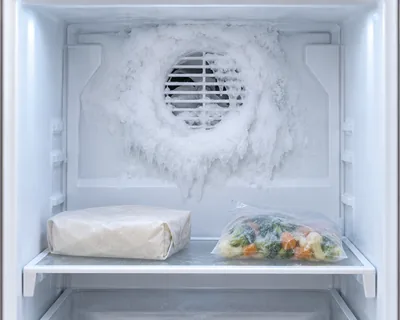
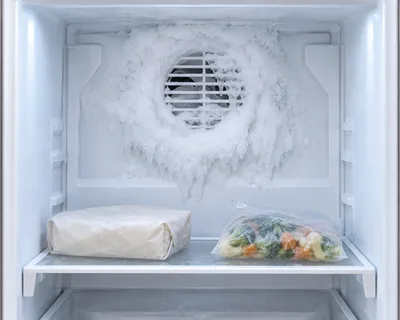
Some symptoms point past the owner checks. A thick layer of frost on the back wall of the freezer, where the cooling coil hides, often means defrosting is not working. A freezer fan you no longer hear running, or one that taps against ice, is a fan or frost issue; LG and Samsung both have codes for freezer fan feedback. A compressor that seems to run all the time while nothing gets cold, or a warm freezer together with a warm fridge after all the checks, suggests the cooling system itself. Samsung’s service triggers include a display still blinking 28 hours after a change, damaged seals, food spoiling sooner than normal, or an error code that is still showing after a power cycle.
On many designs both sections share one cooling coil in the freezer. Frost on that coil, a stopped fan or blocked vents can starve the freezer first. Check vents and frost, then call for service if it persists.
Not if the cause is a seal, airflow or frost. Change one step, wait the full period, and measure.
Samsung suggests turning the unit off for 2 minutes, then waiting about 3 hours. If there is no improvement within 2 hours on a unit that was not cooling at all, it advises service.
It can be a setting issue. Samsung notes ice cream stays firmer below about 3 °F; check the thermometer before anything else.
Sources: temperatures and waiting times come from Samsung, Whirlpool and the FDA.
Samsung US: Cooling issues with a Samsung refrigerator or freezer — checked 2026-11-05.
Whirlpool Product Help: Not Cooling - Freezer Section — checked 2026-11-05.
FDA: Refrigerator Thermometers: Cold Facts about Food Safety — checked 2026-11-05.
Door, code and defrost checks for a freezer that ices up.
Guide
Symptom guide
A warm refrigerator needs two decisions: protect the food and identify the appliance’s next safe step. Start with the…
 Guide
Symptom guide
Visible frost does not identify a failed defrost part. Check the door and display, protect stored food and choose the…
 Guide
Symptom guide
The dial says 3, the display says 37, but what is the real temperature inside? How to verify a refrigerator and…
 Error code
LG refrigerator · FF
The refrigerator reports a freezer-fan problem; frost can obstruct the fan on the covered models.
Check model first
Error code
LG refrigerator · rF
The refrigerator-compartment fan is not operating normally.
Check model first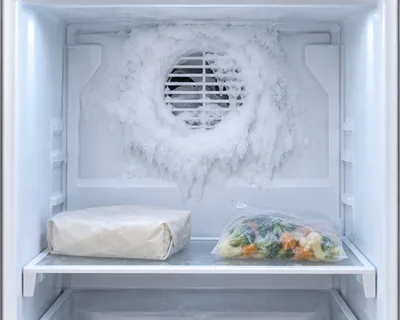 Error code
LG refrigerator · dH
The defrost system did not reach its expected temperature condition within the allowed time.
Call a proThank you! Your feedback helps us make this page better.
Could not send. Please try again.