

 Guide
Symptom guide
Freezer Not Freezing: What to Check Before You Call for Service
Soft ice cream, ice cubes that never set, or a freezer that reads 15 °F. Which checks owners can do, in which order, how…
The dial says 3, the display says 37, but what is the real temperature inside? How to verify a refrigerator and freezer with an appliance thermometer, and how long to wait before judging a change.
By ApplianceCodeHQ Editorial Updated
Refrigerator controls are strangely unreliable witnesses. A dial marked 1 to 7 tells you nothing in degrees, and even a digital display shows what the control board is aiming for or reading at one sensor, not what your milk experiences on the middle shelf. The FDA says it directly: few refrigerator controls show actual temperatures, which is why it recommends an inexpensive freestanding appliance thermometer. This guide shows how to use one, what the targets are, and how to avoid the most common mistake, which is changing the setting again before the last change has had time to work.
The FDA’s guidance is that the refrigerator should be at 40 °F or below and the freezer at 0 °F. Samsung’s refrigerator support page is consistent: it describes keeping the freezer at 0 °F or below and recommends a default freezer setting of -2 °F, with a setting lower than 3 °F for ice cream, where colder means firmer. Those are food-storage figures, not a performance claim for any particular model; your manual may suggest settings in its own terms. The point of the thermometer is to connect the control to those two numbers.
You need two: the FDA recommends one for the refrigerator and one for the freezer. Choose a freestanding appliance thermometer made for the purpose, readable without opening the door if possible. For the refrigerator, put it on a middle shelf, toward the front so you can see it. If you want a second reading, repeat it later in the door shelf, which will usually be warmer, to see the spread. The thermometer should not touch the back wall or sit in front of a vent, where cold air blowing on it will read colder than the shelf. Samsung adds that food should stay 2 inches away from interior vents so that air can circulate, and that the refrigerator needs 2 inches of clearance at the back, top and sides so that heat can escape.
Air temperature jumps every time the door opens, so a quick glance at the thermometer tells you little. The USDA’s appliance thermometer guidance describes a steadier check: put the thermometer in a glass of water in the middle of the refrigerator, leave the door closed for several hours (it gives 5 to 8 hours) and read it. The water changes temperature slowly, so the reading reflects the refrigerator, not the last door opening. If the reading is not in the expected range, adjust the control as the manual describes and repeat.
A glass of water with a thermometer on a middle shelf; a second thermometer in the freezer.
Wait the full period. Do not add large amounts of warm food during the test.
Fridge at 40 °F or below; freezer at 0 °F. Note the time and the control setting.
Adjust by one step, then wait before judging.
Re-measure after the new setting has had time to work.
Samsung’s support page gives numbers that surprise people. After you change the temperature setting, the control panel may take up to 4 hours to show the new setting, and the refrigerator itself may take up to 28 hours to reach the temperature if the doors stay closed. After a power cycle, it suggests about 3 hours before you expect to see the temperature falling. These are one manufacturer’s figures for its refrigerators, but they illustrate the principle: a large insulated box full of food changes temperature slowly. Turning the dial again after an hour just resets the clock.
A reading above 40 °F is a reason to look at causes before you turn the dial to the coldest position. Samsung’s list is practical. Test the door seal by closing a dollar bill halfway in the door; you should feel slight resistance when pulling it out. Clean the seals about once a month with a damp cloth and dish soap. Frost or condensation near the door edge can mean the door is not sealing, and a unit that is not level may have a door that does not meet the cabinet; levelling the refrigerator may fix it. Then check clearance and that vents are not blocked by food. Our cooling guide covers the sequence from the symptom side.
It is the control’s reading at one point. The FDA’s advice is to use a separate appliance thermometer because few controls show actual temperatures.
The FDA target is 0 °F. Samsung describes a default setting of -2 °F, which gives a margin; readings move as the door opens.
Yes. That is why the glass-of-water method reads slower-changing water.
Change it only when the thermometer shows a need, one step at a time, and wait for the result before the next change. Samsung notes that a new setting can take many hours to take effect.
Sources: According to the FDA, the USDA and the manufacturer; this is not an independent measurement.
FDA: Refrigerator Thermometers: Cold Facts about Food Safety — checked 2026-11-03.
USDA FSIS: Appliance Thermometers — checked 2026-11-03.
Samsung US: Cooling issues with a refrigerator or freezer — checked 2026-11-03.
Work through the symptom guide for cooling problems.
Guide
Symptom guide
Soft ice cream, ice cubes that never set, or a freezer that reads 15 °F. Which checks owners can do, in which order, how…
Guide
Symptom guide
Clicks, gurgles and pops are part of how a refrigerator works; tapping, thudding and frozen lettuce usually are not. A…
 Guide
Symptom guide
A warm refrigerator needs two decisions: protect the food and identify the appliance’s next safe step. Start with the…
Guide
Symptom guide
After an outage, preserve any refrigerator code and assess food separately. Samsung startup flashing, power-code…
Guide
Symptom guide
LG OF F and Samsung OF OF can indicate display mode with cooling disabled. Match the panel and model before changing…
 Error code
LG refrigerator · FF
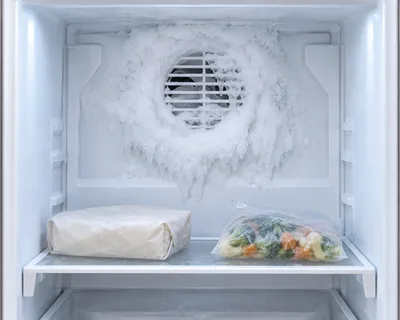
The refrigerator reports a freezer-fan problem; frost can obstruct the fan on the covered models.
Check model firstThank you! Your feedback helps us make this page better.
Could not send. Please try again.